
受上一篇记录的折腾和启发,我对之前的分享《实用脚本分享:一键实现网页文字可编辑功能》进行了增强。现在在原有基础上有了操作提示,并且可以持久化保存!比如页面文案的预览与校对、教学或项目演示中临时修改内容,或者在交互设计中快速替换文本进行视觉模拟,都能大大提升效率,减少繁琐操作。
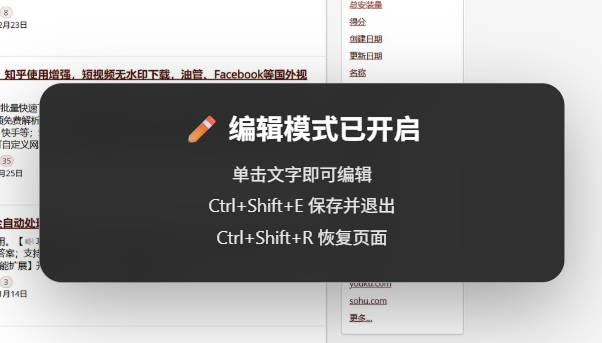
// ==UserScript==
// @name 网页文字编辑器(可持久化版)
// @namespace https://lyoo.net
// @version 2.0
// @description Ctrl+Shift+E 开启/关闭编辑模式,单击直接编辑,24小时持久化保存
// @match *://*/*
// @grant none
// ==/UserScript==
(function () {
'use strict';
const STORAGE_PREFIX = 'shephe_editor_';
const EXPIRE_TIME = 24 * 60 * 60 * 1000;
const STORAGE_KEY = STORAGE_PREFIX + location.href;
let enabled = false;
let currentEditable = null;
let toastTimer = null;
injectStyle();
restoreChanges();
document.addEventListener('keydown', handleShortcuts, true);
function handleShortcuts(e) {
if (
e.ctrlKey &&
e.shiftKey &&
e.key.toLowerCase() === 'e'
) {
e.preventDefault();
if (enabled) {
disableEditor();
} else {
enableEditor();
}
}
if (
e.ctrlKey &&
e.shiftKey &&
e.key.toLowerCase() === 'r'
) {
e.preventDefault();
showConfirm(
'恢复页面',
'删除当前页面所有保存内容?',
() => {
localStorage.removeItem(STORAGE_KEY);
location.reload();
}
);
}
if (
enabled &&
e.key === 'Escape'
) {
finishEditing();
}
}
function enableEditor() {
if (enabled) return;
enabled = true;
document.addEventListener(
'click',
handleClick,
true
);
showToast(
'✏️ 编辑模式已开启',
'单击文字即可编辑<br>Ctrl+Shift+E 保存并退出<br>Ctrl+Shift+R 恢复页面'
);
}
function disableEditor() {
if (!enabled) return;
enabled = false;
finishEditing();
document.removeEventListener(
'click',
handleClick,
true
);
showToast(
'✅ 编辑内容已保存',
'修改将在24小时内持续生效'
);
}
function handleClick(e) {
if (!enabled) return;
const target = getEditableTarget(
e.target
);
if (!target) {
finishEditing();
return;
}
e.preventDefault();
e.stopPropagation();
e.stopImmediatePropagation();
if (
currentEditable &&
currentEditable !== target
) {
finishEditing();
}
if (
target === currentEditable
) {
return;
}
startEditing(target);
}
function getEditableTarget(el) {
const tags = [
'P',
'SPAN',
'A',
'LI',
'TD',
'TH',
'H1',
'H2',
'H3',
'H4',
'H5',
'H6',
'STRONG',
'EM',
'B',
'I',
'LABEL'
];
while (
el &&
el !== document.body
) {
if (
tags.includes(el.tagName) &&
el.innerText &&
el.innerText.trim()
) {
return el;
}
el = el.parentElement;
}
return null;
}
function startEditing(el) {
currentEditable = el;
el.contentEditable = 'true';
el.classList.add(
'shephe-editing'
);
focusEnd(el);
el.addEventListener(
'blur',
handleBlur,
{ once: true }
);
}
function handleBlur() {
finishEditing();
}
function finishEditing() {
if (!currentEditable) return;
saveElement(currentEditable);
currentEditable.contentEditable =
'false';
currentEditable.classList.remove(
'shephe-editing'
);
currentEditable = null;
}
function saveElement(el) {
const selector =
getSelector(el);
if (!selector) return;
let data;
try {
data = JSON.parse(
localStorage.getItem(
STORAGE_KEY
)
) || {};
} catch {
data = {};
}
data.timestamp = Date.now();
if (!data.elements) {
data.elements = {};
}
data.elements[selector] =
el.innerHTML;
localStorage.setItem(
STORAGE_KEY,
JSON.stringify(data)
);
}
function restoreChanges() {
const raw =
localStorage.getItem(
STORAGE_KEY
);
if (!raw) return;
try {
const data =
JSON.parse(raw);
if (
Date.now() -
data.timestamp >
EXPIRE_TIME
) {
localStorage.removeItem(
STORAGE_KEY
);
return;
}
let count = 0;
Object.entries(
data.elements || {}
).forEach(
([selector, html]) => {
const el =
document.querySelector(
selector
);
if (!el) return;
el.innerHTML = html;
count++;
}
);
if (count) {
window.addEventListener(
'load',
() => {
showToast(
'🔄 已恢复历史修改',
`恢复 ${count} 处内容`
);
},
{ once: true }
);
}
} catch {}
}
function getSelector(el) {
const path = [];
while (
el &&
el.nodeType === 1 &&
el !== document.body
) {
let selector =
el.tagName.toLowerCase();
if (el.id) {
selector +=
'#' +
CSS.escape(el.id);
path.unshift(selector);
break;
}
let nth = 1;
let sibling = el;
while (
sibling =
sibling.previousElementSibling
) {
if (
sibling.tagName ===
el.tagName
) {
nth++;
}
}
selector +=
`:nth-of-type(${nth})`;
path.unshift(selector);
el = el.parentElement;
}
return path.join('>');
}
function focusEnd(el) {
requestAnimationFrame(() => {
el.focus();
const range =
document.createRange();
const selection =
window.getSelection();
range.selectNodeContents(el);
range.collapse(false);
selection.removeAllRanges();
selection.addRange(range);
});
}
function showToast(title, text) {
const old =
document.getElementById(
'shephe-toast'
);
if (old) old.remove();
if (toastTimer) {
clearTimeout(toastTimer);
}
const toast =
document.createElement(
'div'
);
toast.id = 'shephe-toast';
toast.innerHTML = `
<div class="shephe-title">${title}</div>
<div class="shephe-text">${text}</div>
`;
document.body.appendChild(
toast
);
toastTimer = setTimeout(
() => {
toast.style.opacity = '0';
setTimeout(
() => toast.remove(),
250
);
},
3000
);
}
function showConfirm(
title,
text,
callback
) {
const old =
document.getElementById(
'shephe-modal'
);
if (old) old.remove();
const modal =
document.createElement(
'div'
);
modal.id = 'shephe-modal';
modal.innerHTML = `
<div class="shephe-modal-box">
<div class="shephe-title">${title}</div>
<div class="shephe-text">${text}</div>
<div class="shephe-actions">
<button class="shephe-btn-cancel">取消</button>
<button class="shephe-btn-ok">确定</button>
</div>
</div>
`;
document.body.appendChild(
modal
);
modal
.querySelector(
'.shephe-btn-cancel'
)
.onclick = () =>
modal.remove();
modal
.querySelector(
'.shephe-btn-ok'
)
.onclick = () => {
modal.remove();
callback();
};
}
function injectStyle() {
if (
document.getElementById(
'shephe-editor-style'
)
) return;
const style =
document.createElement(
'style'
);
style.id =
'shephe-editor-style';
style.textContent = `
.shephe-editing{
outline:2px solid #1677ff !important;
outline-offset:2px;
background:rgba(22,119,255,.06);
}
#shephe-toast,
#shephe-modal{
font-family:
-apple-system,
BlinkMacSystemFont,
"Segoe UI",
sans-serif;
}
#shephe-toast{
position:fixed;
left:50%;
top:50%;
transform:translate(-50%,-50%);
z-index:2147483647;
min-width:420px;
padding:24px 30px;
border-radius:18px;
background:
rgba(20,20,20,.88);
color:#fff;
text-align:center;
backdrop-filter:blur(18px);
transition:.25s;
box-shadow:
0 20px 60px rgba(0,0,0,.35);
}
#shephe-modal{
position:fixed;
inset:0;
z-index:2147483647;
display:flex;
align-items:center;
justify-content:center;
background:
rgba(0,0,0,.35);
backdrop-filter:
blur(4px);
}
.shephe-modal-box{
width:420px;
padding:28px;
border-radius:18px;
background:
rgba(20,20,20,.92);
color:#fff;
text-align:center;
}
.shephe-title{
font-size:22px;
font-weight:700;
margin-bottom:12px;
}
.shephe-text{
font-size:14px;
line-height:1.8;
opacity:.9;
}
.shephe-actions{
margin-top:24px;
display:flex;
justify-content:center;
gap:12px;
}
.shephe-actions button{
border:none;
border-radius:10px;
padding:10px 22px;
cursor:pointer;
}
.shephe-btn-cancel{
background:#444;
color:#fff;
}
.shephe-btn-ok{
background:#1677ff;
color:#fff;
}
`;
document.head.appendChild(
style
);
}
})();


javascript:document.body.contentEditable = 'true'; document.designMode='on'; void 0 之前用这个可以修改,但是无法保存